JavaScript Practice
1. Write a script to greet your website visitor using JS alert box.
2. Write a script to display following message on your web page:
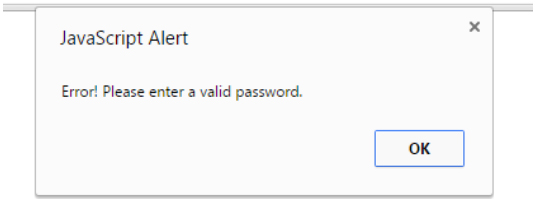
3. Write a script to display following message on your web page: (Hint : Use line break)
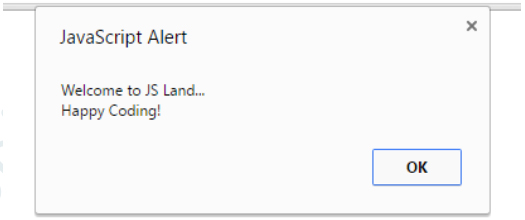
4. Write a script to display following messages in sequence: ALERTS | JAVASCRIPT Page 2 of 3
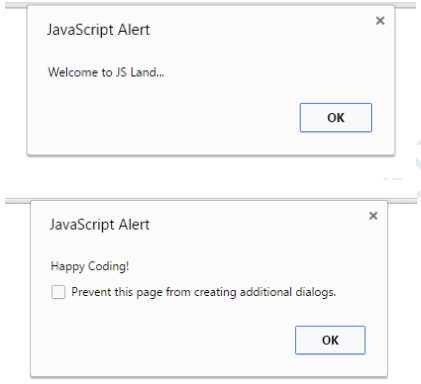
5. Generate the following message through browser’s developer console:
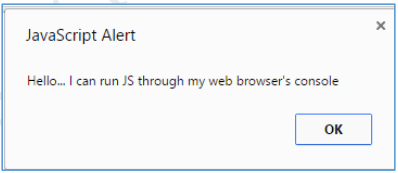
6. Make use of alerts in your new/existing HTML & CSS project.
7. Practice placement of script> /script> element in following sections of your project in exercise 6:
a. Head
b. Body (before your page’s HTML)
1. Declare a variable called username.
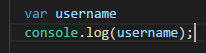
2. Declare a variable called myName & assign to it a string that represents your Full Name.
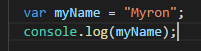
3. Write script to
a) Declare a JS variable, titled message.
b) Assign “Hello World” to variable message
c) Display the message in alert box.
4. Write a script to save student’s bio data in JS variables and show the data in alert boxes.
5. Write a script to display the following alert using one JS variable:
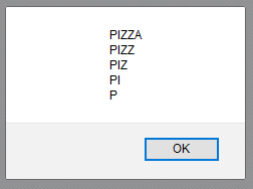
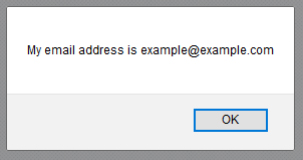
6.Declare a variable called email and assign to it a string that represents your Email Address(e.g. example@example.com).
Show the blow mentioned message in an alert box.(Hint: use string concatenation).
7. Declare a variable called book & give it the value “A smarter way to learn JavaScript”. Display the following
message in an alert box:
8. Write a script to display this in browser through JS.
9. Store following string in a variable and show in alert and browser through JS “▬▬▬▬▬▬▬▬▬ஜ۩۞۩ஜ▬▬▬▬▬▬▬▬▬”
1. Declare a variable called age & assign to it your age. Show your age in an alert box.
2. Declare & initialize a variable to keep track of how many times a visitor has visited a web page. Show his/her
number of visits on your web page. For example: “You have visited this site N times”.
3. Declare a variable called birthYear & assign to it your birth year. Show the following message in your browser:
4. . A visitor visits an online clothing store www.xyzClothing.com . Write a script to store in variables the
following information:
a. Visitor’s name
b. Product title
c. Quantity i.e. how many products a visitor wants to order
Show the following message in your browser: “John Doe ordered 5 T-shirt(s) on XYZ Clothing store”.
1. Declare 3 variables in one statement.
2. Declare 5 legal & 5 illegal variable names.
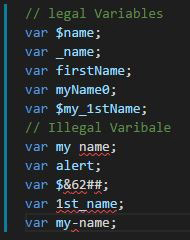
3.Display this in your browser
a) A heading stating “Rules for naming JS variables”
b) Variable names can only contain ______, ______,______ and ______.For example
$my_1stVariable
c) Variables must begin with a ______, ______ or _____. For example
$name, _name or
name
d) Variable names are case _________
e) Variable names should not be JS _________
1. Write a program that take two numbers & add them in a new variable. Show the result in your browser.
2.Repeat task1 for subtraction, multiplication, division & modulus.
3. Do the following using JS Mathematic Expressions
a. Declare a variable.
b. Show the value of variable in your browser like “Value after variable declaration is: ??”.
c. Initialize the variable with some number.
d. Show the value of variable in your browser like “Initial value: 5”.
e. Increment the variable.
f. Show the value of variable in your browser like “Value after increment is: 6”.
g. Add 7 to the variable.
h. Show the value of variable in your browser like “Value after addition is: 13”.
i. Decrement the variable.
j. Show the value of variable in your browser like “Value after decrement is: 12”.
k. Show the remainder after dividing the variable’s value by 3.
l. Output : “The remainder is : 0”.
4. Cost of one movie ticket is 600 PKR. Write a script to store ticket price in a variable & calculate the
cost of buying 5 tickets to a movie. Example output:

5. Write a script to display multiplication table of any number in your browser.
6. The Temperature Converter: It’s hot out! Let’s make a converter based on the steps here.
a. Store a Celsius temperature into a variable.
b. Convert it to Fahrenheit & output “NNoC is NNoF”.
c. Now store a Fahrenheit temperature into a variable.
d. Convert it to Celsius & output “NNoF is NNoC”.
7. Write a program to implement checkout process of a shopping cart system for an e-commerce website. Store
the following in variables
a. Price of item 1
b. Price of item 2
c. Ordered quantity of item 1
d. Ordered Quantity of item 2
e. Shipping charges
Compute the total cost & show the receipt in your browser
8. Store total marks & marks obtained by a student in 2 variables. Compute the percentage & show the result
in your browser
9. Assume we have 10 US dollars & 25 Saudi Riyals. Write a script to convert the total currency to Pakistani
Rupees.
Perform all calculations in a single expression.
(Exchange rates : 1 US Dollar = 104.80 Pakistani Rupee and 1 Saudi Riyal = 28 Pakistani Rupee)
10. Write a program to initialize a variable with some number and do arithmetic in following sequence:
a. Add 5
b. Multiply by 10
c. Divide the result by 2
Perform all calculations in a single expression
11. The Age Calculator: Forgot how old someone is?
Calculate it!
a. Store the current year in a variable.
b. Store their birth year in a variable.
c. Calculate their 2 possible ages based on the store values.
12. The Geometrizer: Calculate properties of a circle.
a. Store a radius into a variable.
b. Calculate the circumference based on the radius, and output “The circumference is NN”.
(Hint : Circumference of a circle = 2 π r , π = 3.142)
Calculate the area based on the radius, and output “The area is NN”. (Hint : Area of a circle = π r2, π
= 3.142)
13. The Lifetime Supply Calculator: Ever wonder how much a “lifetime supply” of your favorite snack is? Wonder
no more.
a. Store your favorite snack into a variable
b. Store your current age into a variable.
c. Store a maximum age into a variable.
d. Store an estimated amount per day (as a number).
e. Calculate how many would you eat total for the rest of your life.
Output the result to the screen like so: “You will need NNNN to last you until the ripe old age of NN”.
1. Write a program to take a number in a variable, do the required arithmetic to display the following result
in your browser:
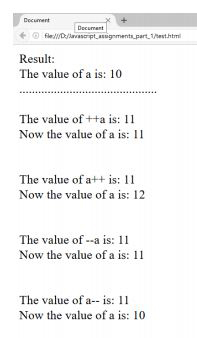
2. What will be the output in variables a, b & result after execution of the following script:
var a = 2, b = 1;
var result = --a - --b + ++b + b--;
Explain the output at each stage:
--a;
--a - --b;
--a - --b + ++b;
--a - --b + ++b + b--;
3.Write a program that takes input a name from user & greet the user.
4. Write a program to take input a number from user & display it’s multiplication table on your browser. If
user does not enter a new number, multiplication table of 5 should be displayed by default.
5.Take
a) Take three subjects name from user and store them in 3 different variables.
b) Total marks for each subject is 100, store it in another variable.
c) Take obtained marks for first subject from user and stored it in different variable.
d) Take obtained marks for remaining 2 subjects from user and store them in variables.
e) Now calculate total marks and percentage and show the result in browser like this.
(Hint: user table)
1. Write a program to take “city” name as input from user. If user enters “Karachi”, welcome the user like
this: “Welcome to city of lights”
2. Write a program to take “gender” as input from user. If the user is male, give the message: Good Morning
Sir. If the user is female, give the message: Good Morning Ma’am.
3. Write a program to take input color of road traffic signal from the user & show the message according to
this table:
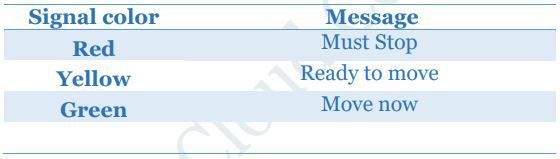
4. Write a program to take input remaining fuel in car (in litres) from user. If the current fuel is less than
0.25litres, show the message “Please refill the fuel in your car”
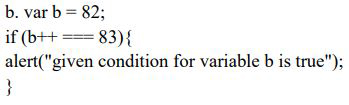
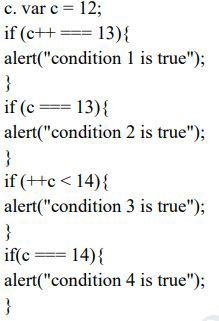
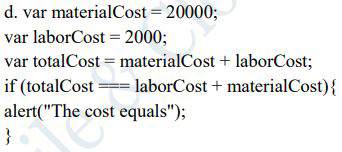
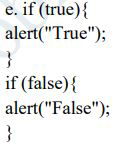
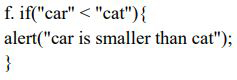
5. Run this script, & check whether alert message would be displayed or not. Record the outputs.
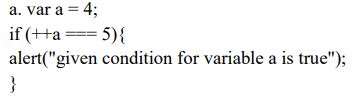
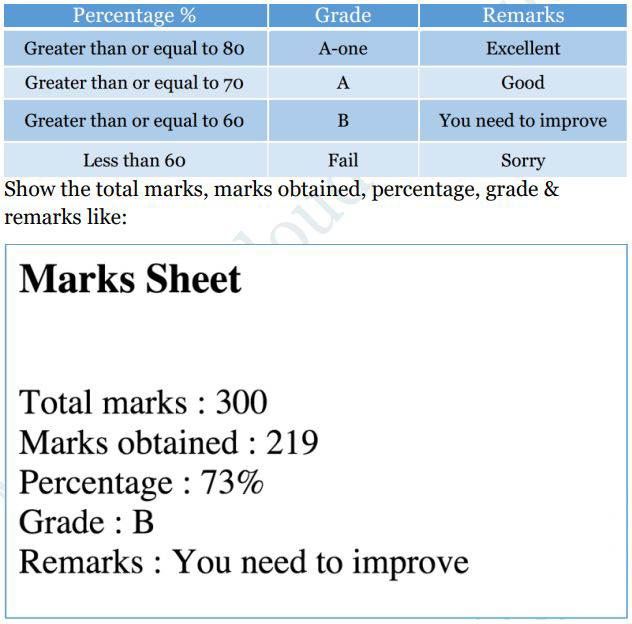
6. Write a program to take input the marks obtained in three subjects & total marks. Compute & show the resulting
percentage on your page. Take percentage & compute grade as per following table:
7.
Guess game:
Store a secret number (ranging from 1 to 10) in a variable.
Prompt user to guess the secret number.
a. If user guesses the same number, show “Bingo! Correct answer”.
b. If the guessed number +1 is the secret number, show
“Close enough to the correct answer”.
8. Write a program to check whether the given number is divisible by 3. Show the message to the user if the
number is divisible by 3.
9. Write a program that checks whether the given input is an even number or an odd number.
10. Write a program that takes temperature as input and shows a message based on following criteria
a. T > 40 then “It is too hot outside.”
b. T > 30 then “The Weather today is Normal.”
c. T > 20 then “Today’s Weather is cool.”
d. T > 10 then “OMG! Today’s weather is so Cool.”
11. Write a program to create a calculator for +,-,*, / & % using if statements. Take the following input:
a. First number
b. Second number
c. Operation (+, -, *, /, %)
Compute & show the calculated result to user
1. Write a program that takes a character (number or string) in a variable & checks whether the given input
is a number, uppercase letter or lower case letter.
(Hint: ASCII codes:- A=65, Z=90, a=97, z=122).
2. Write a JavaScript program that accept two integers and display the larger. Also show if the two integers
are equal.
3. Write a program that takes input a number from user & state whether the number is positive, negative or
zero.
4. Write a program that takes a character (i.e. string of length 1) and returns true if it is a vowel, false
otherwise
5. Write a program that
a. Store correct password in a JS variable.
b. Asks user to enter his/her password
c. Validate the two passwords:
i. Check if user has entered password. If not, then give message “ Please enter your password”
ii. Check if both passwords are same. If they are same, show message “Correct! The password you entered
matches the original password”. Show “Incorrect password” otherwise.
6. This if/else statement does not work. Try to fix it:
var greeting;
var hour = 13;
if (hour
< 18) {
greeting = "Good day";
else
greeting = "Good evening";
}
7. Write a program that takes time as input from user in 24 hours clock format like: 1900 = 7pm. Implement
the following case using if, else & else if statements
1. Declare an empty array using JS literal notation to store student names in future.
2. Declare an empty array using JS object notation to store student names in future.
2. Declare and initialize a strings array.
4. Declare and initialize a numbers array.
5. Declare and initialize a boolean array.
6. Declare and initialize a mixed array.
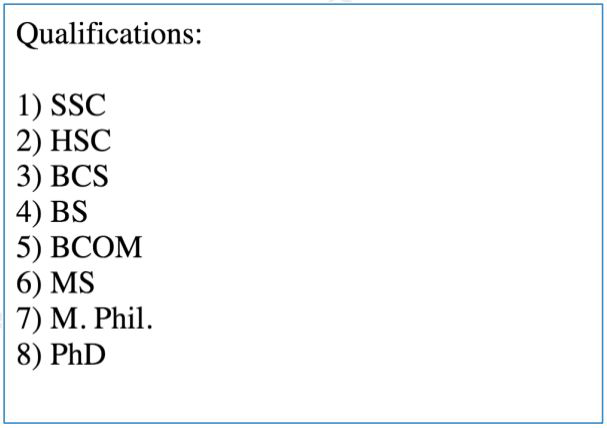
7. Declare and Initialize an array and store available education qualifications in Pakistan (e.g. SSC, HSC,
BCS, BS, BCOM, MS, M. Phil., PhD). Show the listed qualifications in your browser like:
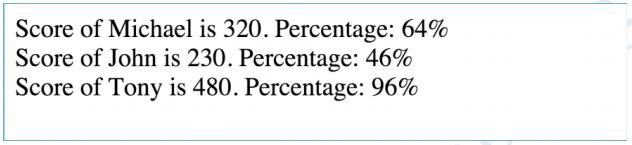
8. Write a program to store 3 student names in an array.Take another array to store score of these three students.
Assume that total marks are 500 for each student, display the scores & percentages of students like:
9. Initialize an array with color names. Display the array elements in your browser.
a. Ask the user what color he/she wants to add to the beginning & add that color to the beginning of the
array. Display the updated array in your browser.
b. Ask the user what color he/she wants to add to the end & add that color to the end of the array. Display
the updated array in your browser.
c. Add two more color to the beginning of the array. Display the updated array in your browser.
d. Delete the first color in the array. Display the updated array in your browser.
e. Delete the last color in the array. Display the updated array in your browser.
f. Ask the user at which index he/she wants to add a color & color name. Then add the color to desired position/index.
. Display the updated array in your browser.
g. Ask the user at which index he/she wants to delete color(s) & how many colors he/she wants to delete.
Then remove the same number of color(s) from user-defined position/index. . Display the updated array in
your browser.
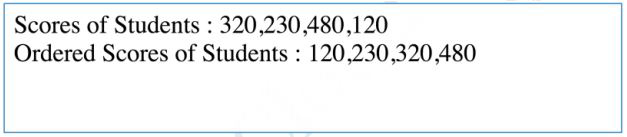
10. Write a program to store student scores in an array & sort the array in ascending order using Array’s sort
method.
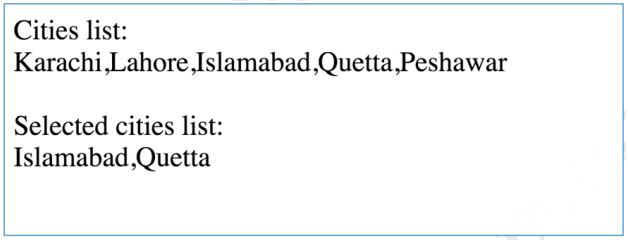
11. Write a program to initialize an array with city names. Copy 3 array elements from cities array to selectedCities
array.
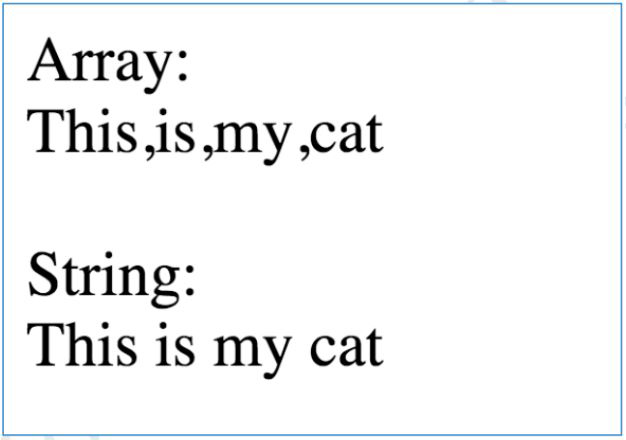
12. Write a program to create a single string from the below mentioned array:
var arr = [“This ”, “ is ”, “ my ”, “ cat”];
(Use array’s join method)
13. Create a new array. Store values one by one in such a way that you can access the values in the order in
which they were stored. (FIFO-First In First Out)
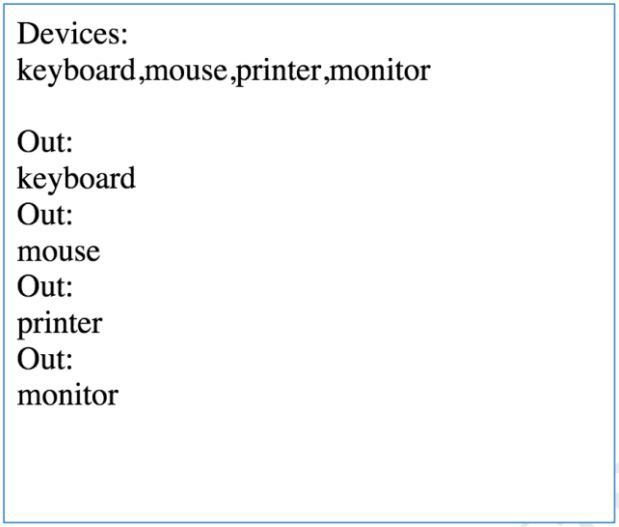
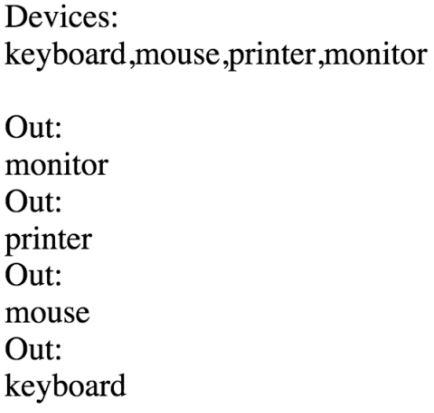
14. Create a new array. Store values one by one in such a way that you can access the values in reverse order.
(Last InFirst Out)
15. Write a program to store phone manufacturers (Apple, Samsung, Motorola, Nokia, Sony & Haier) in an array.
Display the following dropdown/select menu in your browser using document.write() method:
1. Declare and initialize an empty multidimensional array. (Array of arrays)
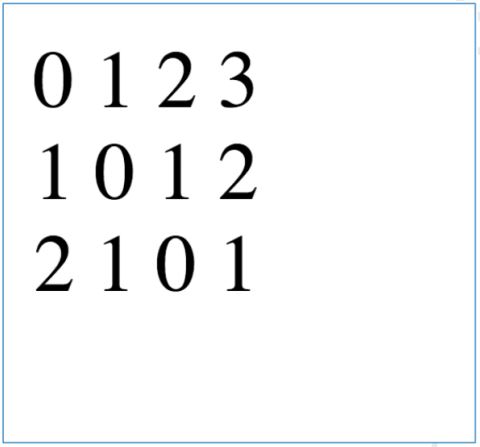
2. Declare and initialize a multidimensional array representing the following matrix:
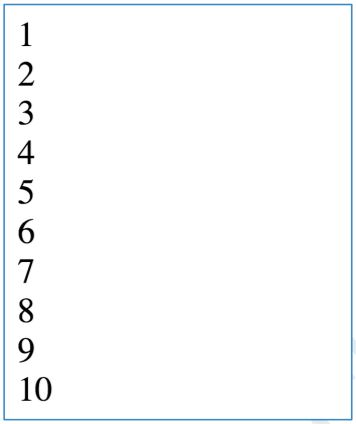
3. Write a program to print numeric counting from 1 to 10.
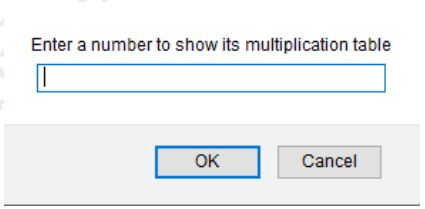
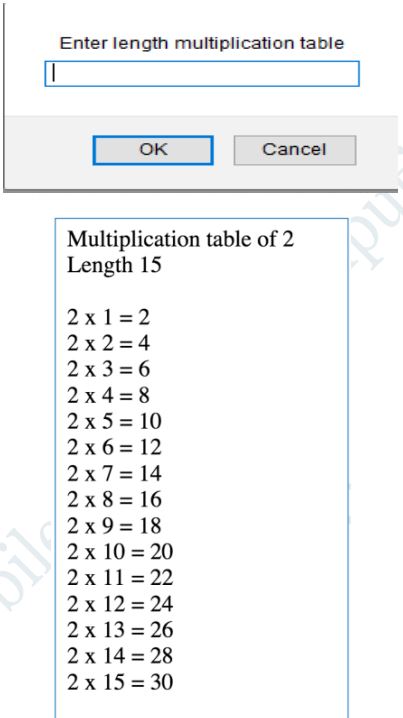
4. Write a program to print multiplication table of any number using for loop. Table number & length should
be taken as an input from user.
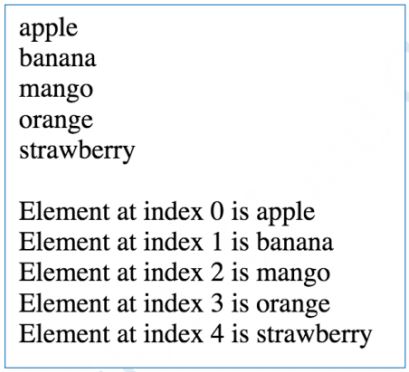
5. Write a program to print items of the following array using for loop:
fruits = [“apple”, “banana”, “mango”, “orange”, “strawberry”]
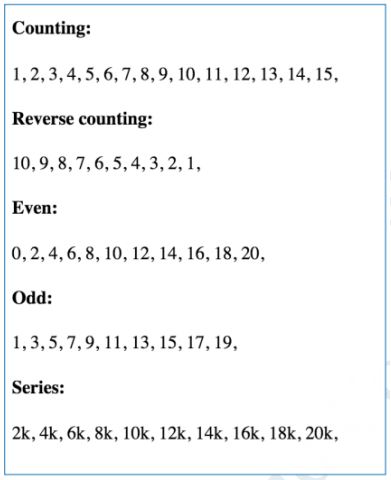
6. Generate the following series in your browser. See example output.
a. Counting: 1, 2, 3, 4, 5, 6, 7, 8, 9, 10, 11, 12, 13, 14, 15
b. Reverse counting: 10, 9, 8, 7, 6, 5, 4, 3, 2, 1
c. Even: 0, 2, 4, 6, 8, 10, 12, 14, 16, 18, 20
d. Odd: 1, 3, 5, 7, 9, 11, 13, 15, 17, 19
e. Series: 2k, 4k, 6k, 8k, 10k, 12k, 14k, 16k, 18k, 20k
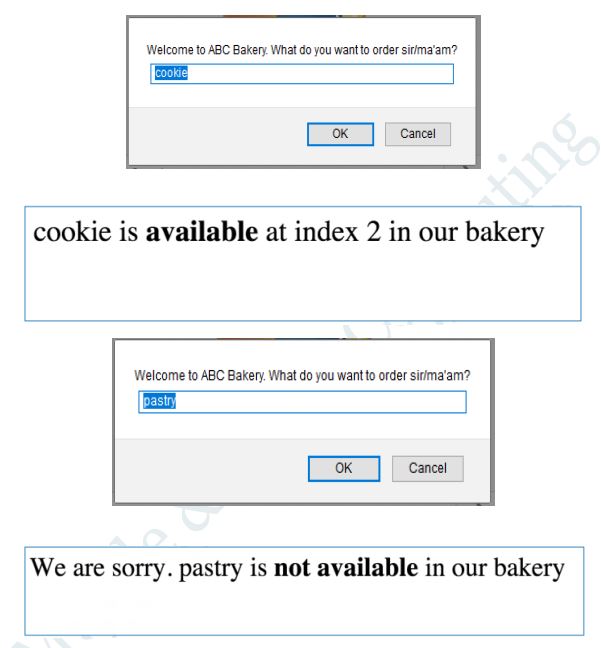
7. You have an array
A = [“cake”, “apple pie”, “cookie”, “chips”, “patties”]
Write a program to enable “search by user input” in an array.
After searching, prompt the user whether the given item is found in the list or not. Example:
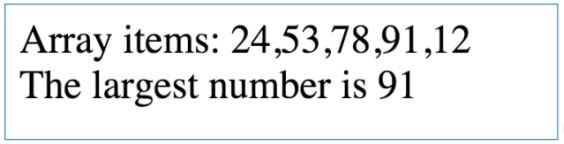
8. Write a program to identify the largest number in the given array.
A = [24, 53, 78, 91, 12].
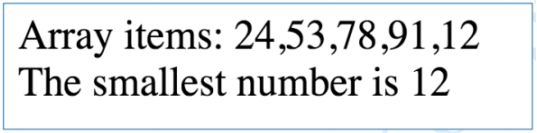
9. Write a program to identify the smallest number in the given array.
A = [24, 53, 78, 91, 12]
10. Write a program to print multiples of 5 ranging 1 to 100.
